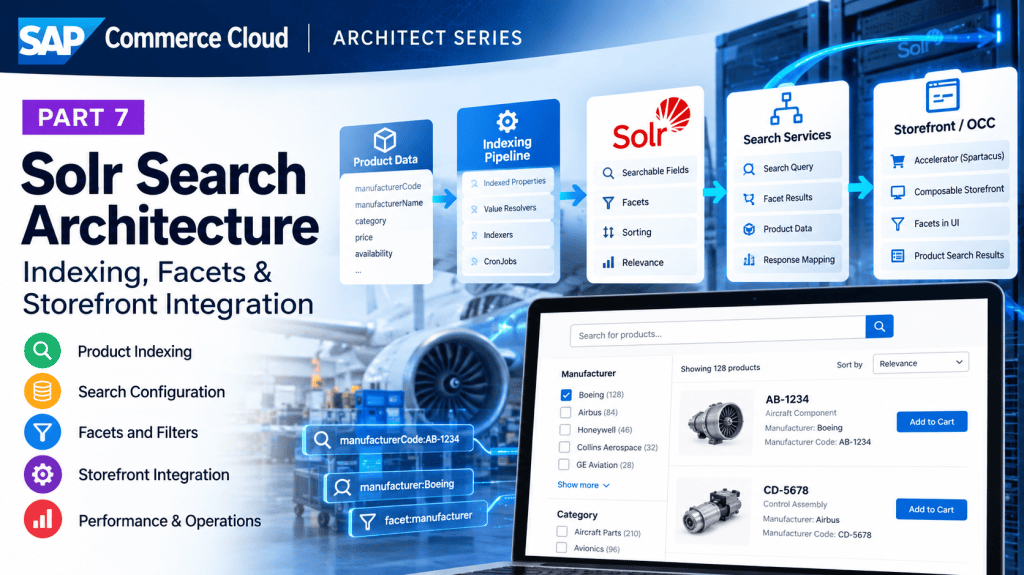
SAP Commerce Solr Architecture — Part 7: From Product Data to a Working Search Filter
A practical B2B implementation story covering indexed fields, search queries, manufacturer facets, OCC, Accelerator, Composable Storefront, and production decisions.
The requirement begins with a missing search result
A customer types an aircraft manufacturer part number into our B2B storefront. The product exists in SAP Commerce, the new attributes are visible in Backoffice, and the customer can open the product through its direct URL. But searching for the manufacturer code returns no results.
The business also wants a Manufacturer filter on the product listing page. Users should be able to search for a part, select a manufacturer, see the result count change, remove the filter, and continue searching without losing their query.
We already use SAP Commerce product search backed by Solr. This is not a project to build a new search engine; it is an extension of an existing search pipeline. We’ll trace that pipeline before making changes, then carry one implementation all the way into the UI.
Our running example
manufacturerCodeis a searchable identifier, such asMFR-AX42.manufacturerNameis a normalized, customer-friendly value, such asAcme Aerospace, used for the Manufacturer facet. The example values are fictional.
First, locate the boundary between Commerce data and Solr
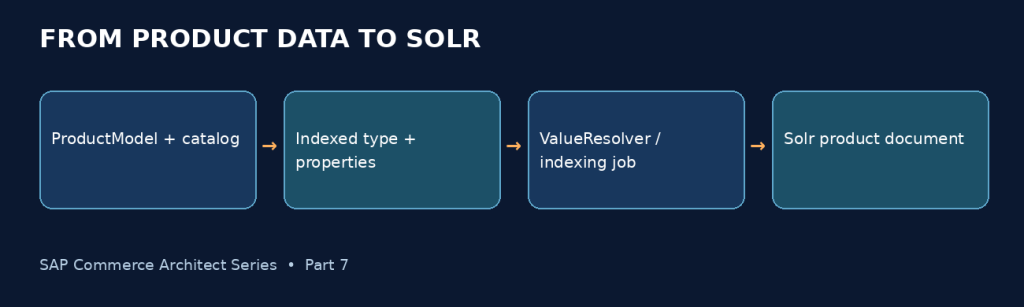
The product database holds our persisted product attributes. Solr holds a search-optimized representation of selected fields. Updating a product does not, by itself, guarantee that a Solr document has changed. An indexing process must populate and publish the relevant document.
ProductModel + catalog/category data │ ▼ SolrIndexedType │ ▼ SolrIndexedProperty │ ▼ field population / value provider │ ▼ Solr index │ search request ▼ facets + matching products
In a SAP Commerce 2211 codebase, start by inspecting the active SolrFacetSearchConfig, its SolrIndexedType, the existing product indexed properties, and the jobs that maintain the index. Avoid creating a parallel indexed type simply because you need two new fields.
Design insight
Solr is a projection optimized for discovery. It should not become the authority for access control, order validation, or rapidly changing customer-specific commercial data.
Extend the product model only when the data is not already available
In this example, the two attributes already exist on the product type. If they do not, the type-system change and data load are separate prerequisites to indexing. An illustrative items.xml fragment looks like this:
<attribute qualifier="manufacturerCode" type="java.lang.String"> <modifiers optional="true"/> <persistence type="property"/></attribute><attribute qualifier="manufacturerName" type="java.lang.String"> <modifiers optional="true"/> <persistence type="property"/></attribute>
After the type-system update and data load, verify values in the intended catalog version. If manufacturer is actually a relation or classification feature in your project, don’t duplicate it onto ProductModel solely for Solr; choose a suitable field-population strategy instead.
Keep the two responsibilities separate: manufacturerCode supports targeted matching; manufacturerName supports readable facet navigation. A code field with thousands of distinct values usually makes a poor sidebar facet.
Configure two indexed properties on the existing product index
The active indexed type tells Commerce which item family is being indexed. Each indexed property tells the indexer what field should exist and which operations the search layer may use. We’ll add one property for searching and one for facet navigation.
The following is a configuration blueprint, not guaranteed import-ready ImpEx: exact attribute headers, referenced provider items, and facet-type codes must be confirmed against the project’s SAP Commerce 2211 extension and existing exported configuration.
# SolrIndexedType: existing Product indexed type# Property: manufacturerCode# type = string# localized = false# multiValue = false# facet = false# field source = Product.manufacturerCode# query participation = exact/boosted identifier search## Property: manufacturerName# type = string# localized = false# multiValue = false# facet = true# facet display = Manufacturer# facet sort = name or count (per UX requirement)# field source = Product.manufacturerName
Why not immediately paste an ImpEx header from another implementation? Solr configuration includes references to field value providers/resolvers, field types, facet configuration, and query behavior that can differ by project setup. The safe implementation sequence is to export one working indexed property from your own system, duplicate its structural pattern, and change only the intended field configuration.
Common mistake
Setting a property as a facet does not make it automatically participate in free-text matching. Likewise, adding a field to the index does not guarantee that OCC returns it as a product attribute.
A practical indexed-property configuration
The following is a project-adaptable ImpEx example for an existing indexed type named Product. Confirm the indexed type name, enum values, provider bean and available attributes in your 2211 patch. It is not a claim that every project has the same configuration.
$indexedType=ProductINSERT_UPDATE SolrIndexedProperty;solrIndexedType(identifier)[unique=true];name[unique=true];type(code);facet;facetType(code);visible;ftsQuery;ftsQueryBoost;$indexedType;manufacturerCode;string;false;;false;true;80;$indexedType;manufacturerName;string;true;MultiSelectOr;true;false;
Important:
MultiSelectOris an example of a facet-type enum used in Commerce configurations; check the enum value supported in the target system. The indexed-property record does not by itself specify how the value is populated. Reuse the existing value resolver/provider convention from your project’s current indexed properties. Field naming and schema details also depend on the installed Solr configuration.
Design insight:
manufacturerCodeis optimized for discovery, whilemanufacturerNameis optimized for a readable facet. An identifier with thousands of distinct values is usually a poor sidebar filter.
Populate the indexed values: use standard configuration before custom Java
For a direct string attribute, use the project’s existing OOTB-compatible field population mechanism where possible. There is little value in a custom Java class that merely calls product.getManufacturerName().
When a value must be derived from related models or normalized from multiple sources, a custom field-value provider/resolver may be justified. Its responsibility is to produce indexable field values—not to decide who is authorized to buy a product.
// Illustrative business transformation; not an SAP provider SPI.public String normalizeManufacturerName(final String rawName) { if (rawName == null) { return null; } final String normalized = rawName.trim(); return normalized.isEmpty() ? null : normalized;}
The actual provider adapter should follow the interface and Spring bean conventions already used in the installed Commerce extension. Test null values, language/currency dimensions where applicable, catalog versions, and multiple source values. Keep expensive remote calls out of the per-product indexing loop.
For an advanced second example, consider availablePlants. If it is computed from warehouse relations or an external inventory service, indexing it introduces data-freshness and fan-out concerns. We will return to this after the basic facet is working.
Use a resolver, not a legacy provider by default
For 2211, favor the ValueResolver extension point. The older FieldValueProvider interface is explicitly deprecated. The following example illustrates the resolver’s core override; package imports, Spring registration, qualifier behavior and project-specific model naming must be completed and compiled in the target codebase.
public class ManufacturerNameValueResolver extends AbstractValueResolver<ProductModel, Object, Object> { @Override protected void addFieldValues(final InputDocument document, final IndexerBatchContext batchContext, final IndexedProperty indexedProperty, final ProductModel product, final ValueResolverContext<Object, Object> resolverContext) throws FieldValueProviderException { final String manufacturer = product.getManufacturerName(); if (manufacturer != null && !manufacturer.isBlank()) { addFieldValue(document, batchContext, indexedProperty, manufacturer.trim(), null); } }}
The snippet is an implementation pattern, not verified drop-in source: confirm the inherited nested context type, signature and required imports against the exact Commerce patch. A resolver like this is only justified if the existing OOTB resolver cannot populate the property correctly. Avoid remote service calls and per-product database queries in indexing loops.
For related attributes such as availablePlants, decide whether to precompute and index a stable eligibility indicator or resolve current availability at request time. A rapidly changing inventory signal is not automatically a good facet.
Run indexing, then inspect the document before touching the UI
With the properties configured, run an appropriate indexing operation in a non-production environment. A full index is useful when establishing new indexed fields; subsequent update indexing should be validated against the project’s change-detection mechanism.
Inspect the resulting Solr document for a known product. Field names often include type or language suffixes generated by the configured field-name provider. Do not assume the physical Solr field name is identical to the indexed-property name.
{ "id": "...project-specific-document-id...", "manufacturerCode_*": "MFR-AX42", "manufacturerName_*": "Acme Aerospace"}
Illustrative document: asterisks stand for generated suffixes, not literal Solr field names.
At this point, if the new fields are missing, troubleshoot the source value, catalog version, indexed-type item selection, field population, and indexing logs. There is no reason to change a React facet component until the underlying Solr document is correct.
Verify the actual document and facet response
After the initial full index, inspect a known product in the appropriate Solr core or collection using the approved non-production tooling. Field names often carry type, language or other suffixes: discover the real schema field rather than assuming manufacturerName is the literal stored name.
# Illustrative Solr parameters; replace collection and actual field namesq=id:YOUR_PRODUCT_DOCUMENT_IDfl=id,manufacturerCode_*,manufacturerName_*# Once you know the actual facet field:q=*:*rows=0facet=truefacet.field=manufacturerName_string
The facet query above is illustrative: replace the field name and apply the same catalog, eligibility and trusted-context restrictions used by the application. A direct unrestricted Solr query is a diagnostic, not a safe storefront search implementation.
Make the manufacturer code participate in the search query
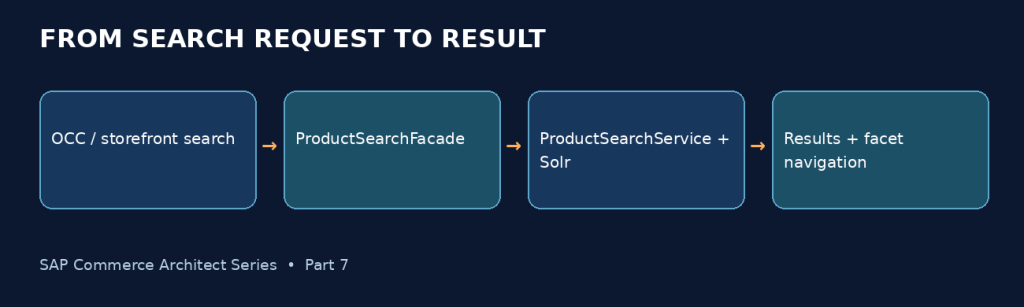
Now the code exists in the index. But typing MFR-AX42 still may not find the product. Indexing a field and querying a field are different steps.
Inspect the active free-text query configuration and search profile used by the product search service. Include the manufacturer-code field using an appropriate query field/analyzer strategy. For part numbers, punctuation, case normalization, and exact versus partial matching matter: MFR-AX42, mfr ax42, and AX42 need an intentional matching policy.
Search term: MFR-AX42 exact manufacturerCode match → high priority exact product code match → high priority partial/normalized code match → candidate product description match → candidate
This ranking is a proposed business relevance policy, not Solr’s automatic default. Test it against a representative set of real product searches before changing boosts in production.
Design decision
For part identifiers, preserve an exact-match path even when analyzed text fields support broader discovery. Otherwise tokenization may unexpectedly split or reorder meaningful identifiers.
Make the query use the new field
The ftsQuery and boost settings influence the indexed property’s participation in configured free-text search. Verify the project’s query templates, analyzer behavior and exact/partial matching. Test MFR-AX42, case changes, punctuation and a description-only match. A field appearing in a Solr document does not prove that the storefront’s query searches it.
For exact manufacturer-part searches, consider normalized identifiers and the appropriate exact-match field strategy. Do not depend on fuzzy matching to repair a missing exact-code path.
Turn manufacturerName into a facet, not just a searchable string
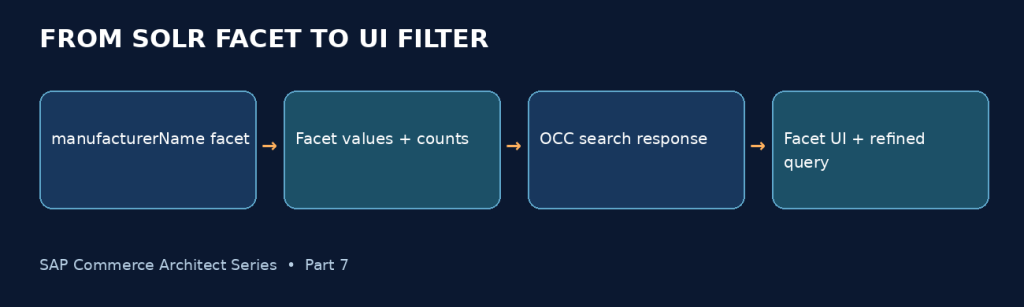
The business now wants a sidebar filter labeled Manufacturer. The manufacturerName property must be configured for faceting with a suitable field type and facet settings. The search request must also ask for facet data through the project’s configured search pipeline.
At the Solr level, a simplified conceptual request resembles:
q=aircraft partsfacet=truefacet.field=<resolved-manufacturer-name-field>fq=<trusted-catalog-and-visibility-filters>
When the customer chooses Acme Aerospace, the next request includes the selected manufacturer as an additional filter query, while retaining the search term and other active filters. Facet counts and available values can change based on the current query and selected filters; exact multi-select semantics depend on the facet configuration.
Initial search term = "aircraft parts" selected manufacturers = noneAfter selection term = "aircraft parts" selected manufacturers = ["Acme Aerospace"]After removal term = "aircraft parts" selected manufacturers = none
Single-select and multi-select facets are different UX and query decisions. In multi-select mode, selecting two manufacturers usually requires OR semantics within that manufacturer dimension, while combining with another dimension such as category typically applies AND semantics. Verify the project’s actual facet behavior rather than assuming it.
Facet configuration is not the UI
Enabling facet=true tells the search layer that the field can be faceted. facetType controls supported selection semantics and visible influences frontend facet visibility. Display labels, ordering, query restrictions and the storefront component still matter. A facet can exist in Solr yet be missing from the API or hidden in the UI.
{ "facets": [{ "code": "manufacturerName", "name": "Manufacturer", "values": [ {"name": "Acme Aviation", "count": 18, "selected": false}, {"name": "Northstar Parts", "count": 7, "selected": true} ] }]}
This JSON is a simplified conceptual response, not a complete OCC response contract. Actual navigation links/query objects and field sets depend on the endpoint and version. Selecting a facet must produce a refined query, not merely hide cards in Angular.
Follow facet values from Solr through the search facade
The Solr response is not the storefront response. The product-search service and facade map low-level search data into Commerce search models, commonly including SearchPageData, facet structures, selected states, and navigation URLs or query representations.
Solr response ├── matching product documents ├── manufacturer facet buckets + counts └── paging / sorting information │ ▼Product search service / facade │ ▼SearchPageData / facet navigation data │ ├── Accelerator rendering └── OCC search response → Composable Storefront
At this layer, inspect whether the manufacturer facet is returned, its display label is correct, values and counts are present, and selecting a value generates a valid query/navigation state. A missing facet in the API is not a frontend styling problem.
For SAP Commerce 2211, inspect the concrete ProductSearchFacade implementation and the installed OCC product-search endpoint and DTO mappings. Endpoint paths and field-set behavior can vary by extension and customization; use the actual response from your environment as the contract.
Refinement should reuse search state
In Commerce 2211, ProductSearchService exposes textSearch(...) and searchAgain(searchQueryData, pageableData). Its documentation describes search-state data as an opaque state that callers should reuse rather than construct arbitrarily. The Solr-backed implementation is DefaultSolrProductSearchService.
Trace FacetSearchPageData and the project’s facade conversion into the API result. Confirm facet values, counts, selected flags, and query/navigation links in the actual OCC payload before changing frontend code.
Expose the facet in Accelerator without inventing a new filtering system
In a traditional Accelerator storefront, the product listing/search page normally renders facet navigation from the search result model. Once the facet is configured and the facade provides its values, the existing facet navigation components may render it without a custom controller.
Trace the current page template/JSP tags or project-specific view components: identify the facet collection passed from the controller, the iteration over facets and values, the selected state, and the URL used when a user selects or removes a value.
Search page model → facets → Manufacturer → Acme Aerospace (128) → Example Avionics (64) → selected query / navigation URL → storefront facet links
If the facet appears in the search response but not in the page, check view conditions, visibility settings, facet naming, and the site’s existing navigation configuration before creating custom rendering logic.
Accelerator: preserve existing facet navigation
With Accelerator, the search controller/facade result is typically rendered by the existing product-listing and facet-navigation view components. First inspect the project’s JSP/tag and CMS configuration for the listing page. If the facet exists in the facade result but not on screen, check the visible flag, page layout, facet component configuration and custom rendering conditions.
Use the generated refinement links or supported search-state mechanism. Do not create a second manually maintained list of manufacturer filters.
Render the same facet in Composable Storefront
In Composable Storefront (formerly Spartacus), the UI typically obtains product-search data through OCC and renders facets in product-listing/search components. The right first step is to inspect the installed storefront version and existing facet components, not to build a new checkbox panel from scratch.
The high-level flow is:
Customer selects Manufacturer value ↓Composable Storefront facet component ↓Product-listing search state / navigation ↓OCC product-search request ↓Commerce search facade → Solr ↓Updated results + facets + selected states ↓UI re-renders filters and products
Verify the OCC payload first. If the manufacturer facet exists in OCC but not on screen, inspect facet component configuration, rendering conditions, routing/query-state handling, and any custom adapters. If it is missing from OCC, return to Commerce configuration and mapping.
Preserve accessibility: facet labels should be meaningful, controls keyboard accessible, selected values visible, and removal actions clear. On mobile, confirm that the filter drawer behaves correctly when query state changes.
Common mistake
Hardcoding manufacturer choices in the frontend. The source of truth for facet values and counts should be the search response, so options reflect the current indexed catalog and query context.
Composable Storefront: use the existing facet components
In Composable Storefront (Spartacus), the product-listing service supplies the search results used by the listing and facet navigation. The documented FacetService exposes facetList$ and UI state; FacetListComponent renders facet groups. Class names and imports can vary by storefront version.
// Conceptual Angular template for a project-specific facet view.// Prefer the shipped facet components unless customization is necessary.<ng-container *ngFor="let facet of facetList.facets"> <section *ngIf="facet.code === 'manufacturerName'"> <h3>{{ facet.name }}</h3> <!-- Render supported facet navigation links/state here. --> </section></ng-container>
When the user selects a manufacturer, the application updates the route/query state and requests a refined result set. Test back/forward navigation, mobile facet dialog, selection removal, multi-select behavior, and accessible labels. Do not filter only the currently loaded product cards client-side.
Test the feature as a customer, not only as a developer
We now have a field in the index, a query that searches it, and a Manufacturer facet that reaches the UI. The end-to-end acceptance test should mirror the original business requirement:
- Search for a known manufacturer code and confirm the expected product ranks appropriately.
- Search for a broad phrase and verify the Manufacturer facet appears with readable labels.
- Select a manufacturer and confirm results, counts, and selected-state indicators change.
- Remove the facet and confirm the original search term remains intact.
- Combine manufacturer with category and verify intended AND/OR semantics.
- Repeat with pagination, sorting, browser back navigation, and a mobile viewport.
- Check the response and direct product access under two different B2B customer entitlements.
- Update a manufacturer value, run the configured indexing path, and verify freshness.
A successful Solr Admin query is only one checkpoint. The feature is complete when the customer can actually use the filter without unexpected behavior.
The next requirement reveals why Value Providers and freshness matter
After Manufacturer is released, the business asks for an Available Plant facet. Unlike manufacturer name, availability may depend on warehouses, stock, allocations, customer context, and live ERP data.
We should not immediately copy the manufacturer facet implementation. First decide what the facet actually means. Is it a relatively stable plant-to-product relationship, or a promise that inventory is available right now for this specific customer?
If it is stable catalog metadata, indexing may be appropriate. If it reflects live, customer-specific availability, a shared Solr facet may be stale or misleading. An enrichment or specialized availability search design may be safer, depending on the business contract.
Design decision
Do not index rapidly changing or sensitive data merely because the UI wants a filter. Define the freshness requirement and audience first; then select the architecture.
When a custom field provider is needed, pay attention to N+1 database access. A provider that performs one expensive query per product can make full indexing unacceptably slow. Prefer bounded reads, precomputed relationships, or efficient batching where the platform and source allow them.
Production reality: missing products, stale facets, and slow search
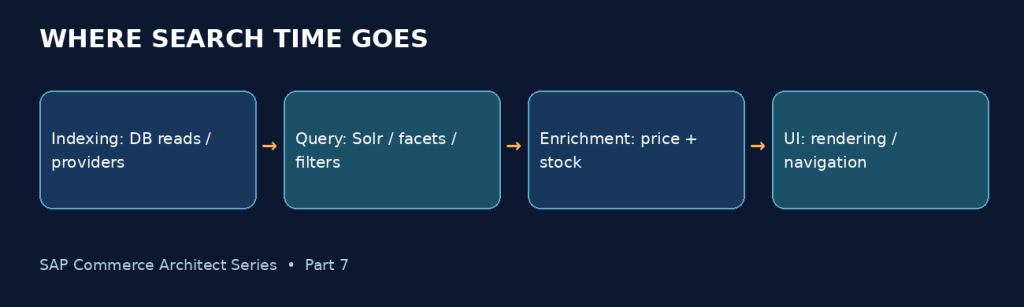
Imagine a manufacturer name changes in the source catalog but the old facet value remains visible. Investigate the source data, index eligibility, full/update indexing status, the indexed document, and then the query/facade/UI layers—in that order.
For missing products, check catalog versions, approval and online dates, indexed-type item selection, search filters, and B2B visibility rules. For slow searches, separate Solr execution time from query building, response conversion, price/stock enrichment, and network latency.
INDEXING LANE SEARCH LANEsource product data request + trusted context ↓ ↓indexed-type selection query construction ↓ ↓field value population Solr execution + facets ↓ ↓index job + Solr write mapping + enrichment ↓ ↓indexed document OCC / storefront response
Do not run repeated full indexes to hide a persistent item-selection bug. Do not optimize Solr queries when the measured latency is caused by sequential remote inventory calls after search.
Separate indexing latency from request latency
For an indexing slowdown, inspect the product-selection query, resolver execution, database reads and batch throughput. For a slow search page, separately time Solr execution, facade conversion, price/stock enrichment, and serialization. A fast Solr query can still lead to a slow page when twenty results trigger twenty sequential remote inventory calls.
Measure before adding caches: cached customer-specific prices and stock require carefully defined scope, freshness and invalidation. The right optimization follows the measured bottleneck.
Security and CCv2: two boundaries the implementation must respect
A customer-specific product visibility rule cannot depend only on whether a facet hides an item. Resolve customer and B2B-unit context from authenticated server-side state, apply appropriate search filtering, and independently enforce authorization for product detail and cart operations.
For CCv2, review the supported search service topology and operational procedures in the target environment. Classic assumptions about local Solr processes, filesystem access, or manual index maintenance may not apply. Inventory custom providers, indexed properties, indexing jobs, query overrides, and monitoring before migrating.
The objective is to carry forward the business behavior—not every historical customization. Retest indexing, query relevance, facet navigation, and performance at representative catalog scale.
A search facet must not bypass entitlement rules
Customer-specific restrictions should be derived from authenticated context. A user-supplied facet parameter is never evidence of entitlement. Product details and add-to-cart must enforce authorization independently of what the search page displays.
For CCv2, validate managed search configuration, deployment compatibility, index-job operations and observability in the target environment. Do not assume on-premise Solr administration commands or direct filesystem access are available.
What this implementation teaches us about architecture
We began with two attributes and one search request. The finished feature crossed the product model, Solr indexed configuration, field population, indexing operations, query behavior, search result mapping, OCC, and two possible storefront technologies.
Each layer had a clear responsibility. The model supplied data. The index made selected values searchable. The query determined matching and filtering. The facade and API expressed facet navigation. The UI made that navigation usable. Security and business services protected operations that Solr alone cannot guarantee.
Final design insight
A facet is not just a checkbox. It is a coordinated contract across data modeling, indexing, search behavior, API response, and user interaction. Understanding that contract is what makes the implementation maintainable.
SAP Commerce Architect Series — Practical SAP Commerce learning focused not only on how the platform works, but on how to think through enterprise design decisions.


Leave a Reply